

Decision Providers
A decision provider is a hosted model that answers StructuredAI's typed questions (choice, score and yes/no) with its own probabilities and confidence. It is an alternative to the local checkpoints for workspaces that have not downloaded one, for inputs longer than a checkpoint's context, and for languages the English checkpoint does not read.
Four providers are supported:
| Provider | Generated name | Models | Endpoint |
|---|---|---|---|
| TypeSafe Jev | DecisionProviders.TypeSafeJev |
jev-latest (default), jev-1.14.0, jev-1.13.0 |
https://api.typesafe.ai/v1/systemone |
| OpenAI Decisions | DecisionProviders.OpenAIDecisions |
gpt-6-luna (the API is in public beta) |
https://api.openai.com/v1/decisions |
| Inception Mercury Decide | DecisionProviders.MercuryDecide |
mercury-decide |
https://api.inceptionlabs.ai/v1/decisions |
| Cloudflare Workers AI | DecisionProviders.Cloudflare |
clef (default), clef-flash, clef-omni; extraction model clairic |
https://api.cloudflare.com/client/v4/accounts/{account}/ai/run/@cf/cloudflare/{model} |
All four bill per input token only. Output tokens are not charged.
A provider's model is either a decision model, which answers questions, or an extraction model. An extraction model reads typed values out of a text, for Structured Extraction. Cloudflare's Clairic is the only one so far.
The input goes to the vendor
A local checkpoint keeps the text in the workspace. A decision provider sends every input, and the question texts, to the vendor's API. Check that this is acceptable for the data before pointing code at one.
Set up a provider
- Go to Manage → AI → Decision Providers (
#/manage/ai/decision-providers). - Pick the provider in the list on the left.
- Click Set up, or turn on one of its models, which opens the same form.
- Paste the API key. Get an API key opens the vendor's console.
- For Cloudflare, enter the Account ID as well. It is on the Workers AI page of the Cloudflare dashboard, under Get Account ID. The API token needs the Workers AI Read and Workers AI Edit permissions.
- Optionally, enter an Endpoint: a URL that serves the same API, such as a gateway in front of the vendor. Leave it empty for the vendor's own. For Cloudflare, write
{account}and{model}where the URL takes them; they are filled in per request. A Cloudflare AI Gateway URL, for example:https://gateway.ai.cloudflare.com/v1/{account}/<gateway>/workers-ai/@cf/cloudflare/{model}. - Click Test. The form asks three questions about the sample text (a choice, a score and a yes/no) using the settings as they are on the form, saved or not. With an extraction model selected, it extracts three fields from the text instead: what the writer asks for, a deadline and a count. It shows the answers, the model that answered, the time taken and the input tokens. A wrong key shows the vendor's own error message.
- Click Set up to save.
The API key is stored in the graph, encrypted on disk when MSK_GRAPH_MASTER_KEY is set, and never sent back to the browser. To change other settings without retyping it, leave the key field empty when you save.
The test is a real request. It is billed, and it is recorded in LLM usage like any other decision.
Models
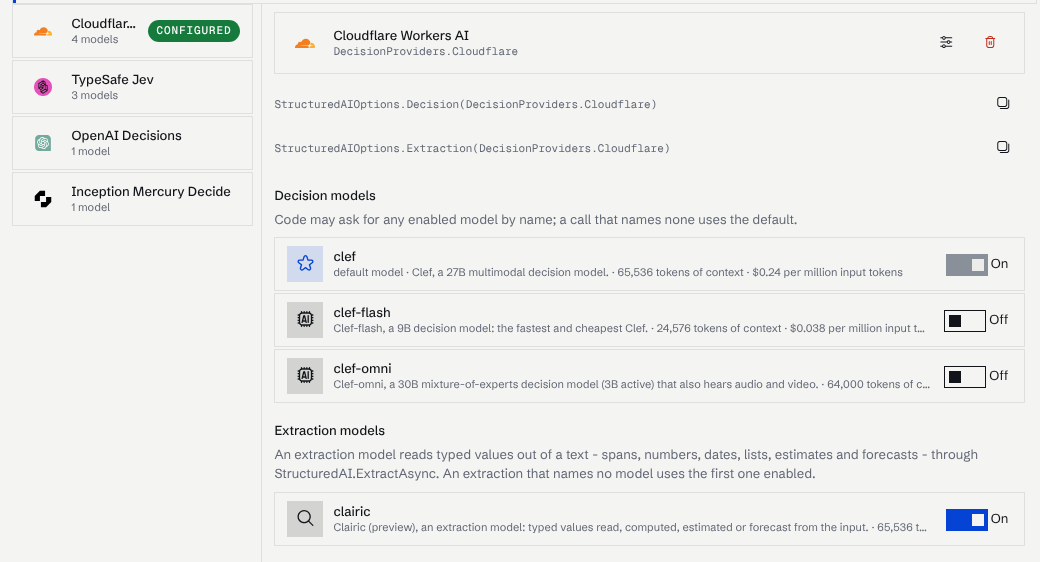
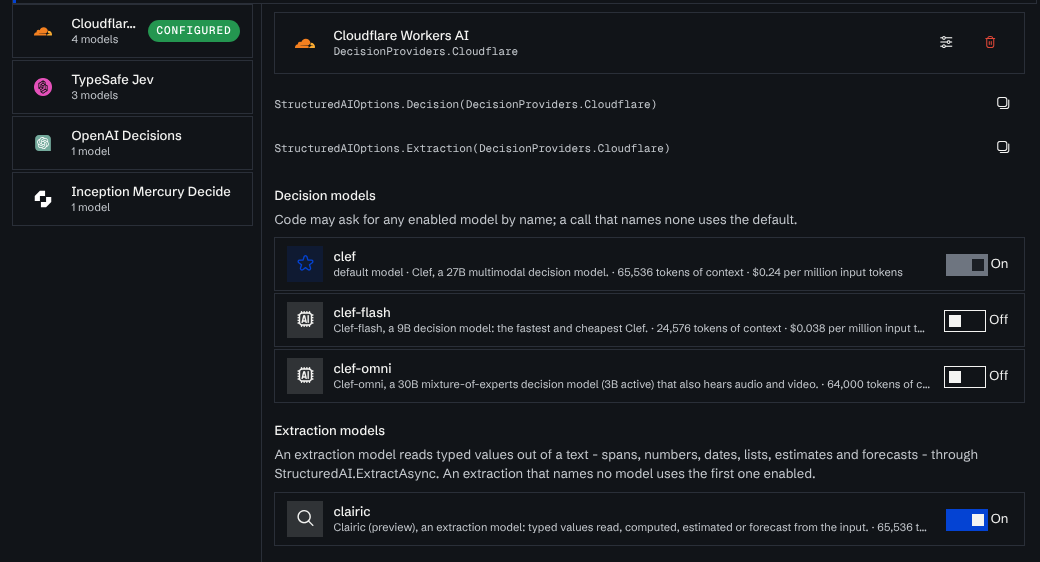
The right-hand pane lists every model of the selected provider:
- The toggle sets whether code may ask for the model by name.
- Make default sets the model a call answers with when it names none. The default model is always enabled; make another one the default to turn it off.
Each row shows the model's context size and input price.
A provider with an extraction model lists it under Extraction models. An extraction model cannot be the default, because the default answers questions. An extraction that names no model uses the first extraction model enabled. Turning Clairic on for a provider that is not set up yet sets it up with clef as its default.
Use it from code
Name the provider with its generated constant. The provider's settings card shows the exact line to copy:
using Mosaik.AI;

var options = StructuredAIOptions.Decision(DecisionProviders.MercuryDecide, userUID: CurrentUser);

var answers = await StructuredAI.AskAsync(ticket.Body, q => q
    .Choice("department", "Which team should handle this?", o => o
        .Option("billing",   "payments, invoices and refunds")
        .Option("technical", "bugs or integration problems")
        .Option("other"))
    .YesNo("urgent",      "The message conveys urgency")
    .Score("frustration", "How frustrated is the customer?", "calm", "annoyed", "very angry"),
    options, CancellationToken);
To use a model other than the default, pass it by name. It must be enabled on the provider:
var pinned = StructuredAIOptions.Decision(DecisionProviders.TypeSafeJev, "jev-1.14.0");
userUID attributes the request's usage to a user. Without it the usage is recorded without one.
The generated name is fixed per provider and does not change when you rename the provider in the settings form. Code naming DecisionProviders.TypeSafeJev keeps compiling if the provider is removed and set up again. If it is removed and not set up again, that code no longer compiles.
What a request looks like
- One request per input. Every question about an input goes in the same request.
AskManyAsyncruns up toMaxConcurrentRequests(4 by default) inputs at a time. - Re-ranking sends one yes/no request per candidate, with the query and the candidate as its input.
- There is no prompt.
StructuredAIOptions.InstructionsandUseStructuredOutputonly apply to LLM providers. Put guidance in the question texts and the option descriptions. - Retries. A request the vendor answers with 429, 502, 503 or 529 is retried twice, after one and then two seconds. Each attempt times out after 60 seconds.
ActionProbabilityequalsConfidence, because the hosted models have no separate action head.
Errors
A call throws DecisionProviderException when:
- the provider is not set up, or has no API key, or (for Cloudflare) no account ID;
- the model asked for is not enabled on it (the message lists the enabled ones);
- the model asked for is an extraction model, which cannot answer questions;
- the vendor's API refused the request.
StatusCodeandResponseBodyhold its answer, and the message carries the vendor's error text.
An answer that cannot be read, or a question the vendor refused to answer, throws StructuredAIPredictionException.
Check StructuredAI.IsAvailable(options) first in code that must keep working when no provider is set up.
Usage and cost
Every request is recorded on Manage → Operate → LLM Usage (#/manage/operate/llm-usage), under the model the vendor reports and attributed to the vendor (typesafe, openai, inception, cloudflare). An alias is recorded as what it resolved to: jev-latest is recorded as jev-1.13.0, and a Workers AI id such as @cf/cloudflare/clef as clef. Failed requests are recorded with their error. Cost is calculated from the reference prices when cost calculation is enabled.
Differences between the providers
| TypeSafe Jev | OpenAI Decisions | Mercury Decide | Cloudflare Clef | |
|---|---|---|---|---|
| Request format | System One (state, questions by id) |
Decisions (input, questions as a list) |
System One | System One, wrapped in Cloudflare's result envelope |
Yes/no descriptions (yesMeans, noMeans) |
Sent as criteria | Appended to the question text | Sent as criteria | Sent as criteria |
| Context | 65,536 tokens per request | Not published | 65,536 tokens | clef 65,536, clef-flash 24,576, clef-omni 64,000 tokens |
| Input price per million tokens | $0.042 | $0.10 | $0.02 at launch | clef $0.24, clef-flash $0.038, clef-omni $0.15 |
| Account ID | No | No | No | Yes |
Mercury Decide and Cloudflare's Clef speak the same request format as TypeSafe's System One API, so they behave the same from code.