
Themes
Description
A theme package restyles every Tesserae component while it is active. Add the NuGet package, then switch it on and off at run time with Theme.SetCustomTheme. Fourteen packages are published, one per design language.
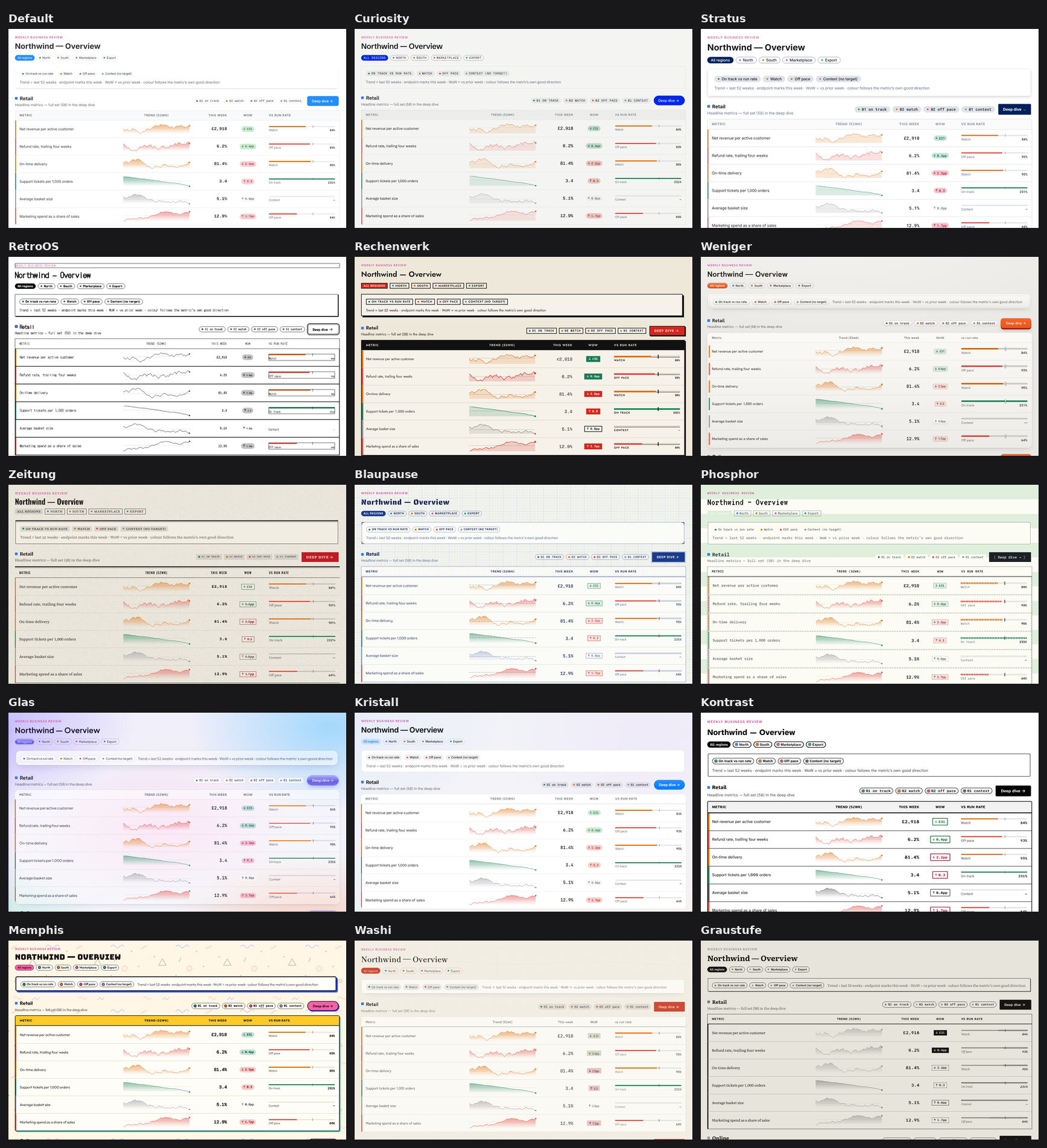
The image is one page of the gallery, the Dashboard sample (a KPI scorecard of sparklines, deltas and target bars), captured in light mode with each theme active. Nothing on the page changes between tiles except the theme.
How a theme works
A theme owns one root class name. Activating the theme adds that class to document.body and deactivating it removes the class. Every rule in the theme's stylesheet starts with that class, so the stylesheet can stay loaded after the theme is switched off and stops matching. Because the class is on the body, it also reaches layers such as modals, panels, tooltips and menus, which mount on the body.
The stylesheet is not linked from index.html. The package declares it with "load": false in its tps.json, so Transpose copies it into the application's output and the theme fetches it the first time it is activated.
Usage
Reference the package of the theme you want, then pass its Instance to Theme.SetCustomTheme.
using Tesserae;
using Tesserae.Themes.Curiosity;   // PackageReference Tesserae.Themes.Curiosity

await UI.Theme.SetCustomTheme(CuriosityTheme.Instance);   // loads the CSS once, then adds the class
await UI.Theme.ClearCustomTheme();                         // back to the default look
var current = UI.Theme.CustomTheme;                        // null when no theme is active
SetCustomThemeloads the new theme's stylesheet before it removes the previous theme, so switching does not flash the default look. Overlapping calls resolve to the last one. It raisesTheme.OnThemeChanged.- Light and dark mode are independent of the theme.
Theme.Dark()andTheme.Light()keep working, and every theme styles both. - Colors you set yourself win. While a theme is active,
Theme.SetPrimary,Theme.SetBackground,Theme.SetHighlightandTheme.Build()...Apply()restate their variables as!importantunder thetss-custom-thememarker class, so an application can run a packaged theme and still change its primary color. See Theme Colors and Theme Builder.
To avoid painting the default look for one frame on first load, hide the body until the theme is in:
document.body.style.visibility = "hidden";

async Task ShowThemed()
{
    try     { await UI.Theme.SetCustomTheme(CuriosityTheme.Instance); }
    finally { document.body.style.visibility = ""; }
}

ShowThemed().FireAndForget();
The packages
Every package follows the same pattern: a namespace Tesserae.Themes.<Name>, a singleton <Name>Theme.Instance, the root class tss-theme-<id>, its own design tokens in tss.common.css, bundled OFL fonts (nothing is loaded from Google Fonts) and a README that lists the design rules every stylesheet in the package follows.
| Package | Instance | Look |
|---|---|---|
Tesserae.Themes.Curiosity |
CuriosityTheme.Instance |
The Curiosity brand: paper and ink, one blue for primary actions, 1px hairlines instead of shadows, square inputs with pill buttons, hairline scrollbars. Schibsted Grotesk and Geist Mono. |
Tesserae.Themes.Stratus |
StratusTheme.Instance |
An aerospace design language: deep navy accent, cool grays, filled inputs with a bottom rule, a tiered elevation scale for shadows, a 2px blue focus ring. Inter and Roboto Mono. |
Tesserae.Themes.RetroOS |
RetroOSTheme.Instance |
The 1984 Macintosh: one bit of color, dithered grays, pinstriped title bars, hard 1px and 2px shadows, inverted selection. Dark mode is reverse video. |
Tesserae.Themes.Rechenwerk |
RechenwerkTheme.Instance |
After Kraftwerk's record sleeves: cream, ink and signal red in light, a black raster screen with terminal yellow in dark. Hard offset shadows, buttons that press into their shadow, and a sidebar that stays black in both modes. |
Tesserae.Themes.Weniger |
WenigerTheme.Instance |
Skeuomorphic, after West German industrial design: gray plastic panels with an inset groove, brushed aluminium knobs, extruded button slabs, LED lamps, and metrics on a 7-segment LCD. Dark mode is the charcoal edition. |
Tesserae.Themes.Zeitung |
ZeitungTheme.Instance |
A broadsheet newspaper: newsprint (dark stock at night), one spot red, a serif with small caps and old-style figures, double rules instead of shadows. |
Tesserae.Themes.Blaupause |
BlaupauseTheme.Instance |
Engineering drawings: a cyanotype blueprint in dark, a whiteprint in light, a drafting grid, no shadows, dimension-line separators, red-pencil focus. |
Tesserae.Themes.Phosphor |
PhosphorTheme.Instance |
A character terminal: green phosphor with glow and scanlines in dark, green-bar line-printer paper in light, box-drawing frames, inverse-video selection. |
Tesserae.Themes.Glas |
GlasTheme.Instance |
Liquid glass over a color field. Overlays blur the page and, in Chromium, refract it. |
Tesserae.Themes.Kristall |
KristallTheme.Instance |
After the translucent macOS desktop look: a wallpaper, a frosted sidebar, glass menus, sheet modals, capsule buttons. Everything turns opaque under prefers-reduced-transparency. |
Tesserae.Themes.Kontrast |
KontrastTheme.Instance |
Accessibility first: 7:1 text contrast, a two-tone focus ring that is never removed, state shown by shape as well as color, and forced-colors and prefers-contrast handled. |
Tesserae.Themes.Memphis |
MemphisTheme.Instance |
After the 1980s Memphis movement: six bright fills, thick outlines, hard offset shadows in a second color, confetti and squiggle patterns. |
Tesserae.Themes.Washi |
WashiTheme.Instance |
Japanese paper and ink: a vermilion seal stamp marks what is chosen, brush-stroke rules, a lattice sidebar. Dark mode is urushi lacquer with gold focus. |
Tesserae.Themes.Graustufe |
GraustufeTheme.Instance |
An e-paper display: a 16-level gray ramp and nothing else, dithered edges instead of shadows, and no motion. |
Curiosity components
Tesserae.Themes.Curiosity also carries five components from the Curiosity website: PixelIntro, FlowField, PixelGlyph, DashMosaic and GeneratingImage. They work with or without the theme active. See Curiosity components.
Building a theme picker
Theme.CustomTheme tells you which theme is active, so a picker only needs a list of instances and the name each one reports.
var themes = new ICustomTheme[]
{
    CuriosityTheme.Instance,
    StratusTheme.Instance,
    ZeitungTheme.Instance,
};

var picker = Dropdown().Items(themes.Select(t => DropdownItem(t.Name)).ToArray());

picker.OnChange((_, _) =>
{
    var chosen = themes.FirstOrDefault(t => t.Name == picker.SelectedText);
    _ = chosen is null ? UI.Theme.ClearCustomTheme() : UI.Theme.SetCustomTheme(chosen);
});
The gallery stores the choice in localStorage["tss-sample-theme"] and restores it on load.
Writing your own theme
A theme is a Transpose library that references Tesserae, with one class and a set of stylesheets.
public sealed class MyTheme : CustomTheme
{
    public static MyTheme Instance { get; } = new MyTheme();
    private MyTheme() : base("My Theme", "tss-theme-mine", "assets/css/tss-theme-mine.css") { }
}
- Name each stylesheet after the Tesserae stylesheet it restyles (
tss.button.css,tss.dropdown.css) and add atss.common.cssthat redefines the--tss-*variables. - Start every selector with the root class:
body.tss-theme-mine .tss-btn, andbody.tss-theme-mine.tss-dark-mode ...for dark. - Redefine a derived variable together with its
-rootvalue.--tss-x-color: rgb(var(--tss-x-color-root))is resolved where it is declared, so changing only the root on the body leaves the derived variable at Tesserae's value. - Combine the files into one resource in
tps.jsonwith"load": false. The URL passed toCustomThemeis the group'soutputplus itsname.
"resources": [
    { "name": "tss-theme-mine.css", "load": false, "output": "assets/css",
      "files": [ "tps/assets/css/tss.common.css", "tps/assets/css/tss.button.css" ] }
]
See also
- Theme Colors – Switch light and dark and change the primary, background and highlight colors.
- Theme Builder – Set every color variable with a light and a dark value.
- Colors – The color tokens a theme redefines.