

Analysis
An analysis works out what an application does and writes it down, with the source lines behind every claim. It maps the application, explores it from its entry points, writes the document you asked for, and checks each claim against the code before it finishes.
Use it to get a first specification of a system nobody documented, to document one feature before you change it, or to answer a question that needs more than one conversation: which jobs touch the customer table, where a late fee is calculated.
Before you start
- The application has at least one indexed repository. An analysis reads the current revision of each.
- A model is configured under Manage > AI > LLM Providers. The analysis sends the code it reads to that model.
- You are an administrator. Anyone who may read the application can watch the analysis and read what it writes.
Start an analysis
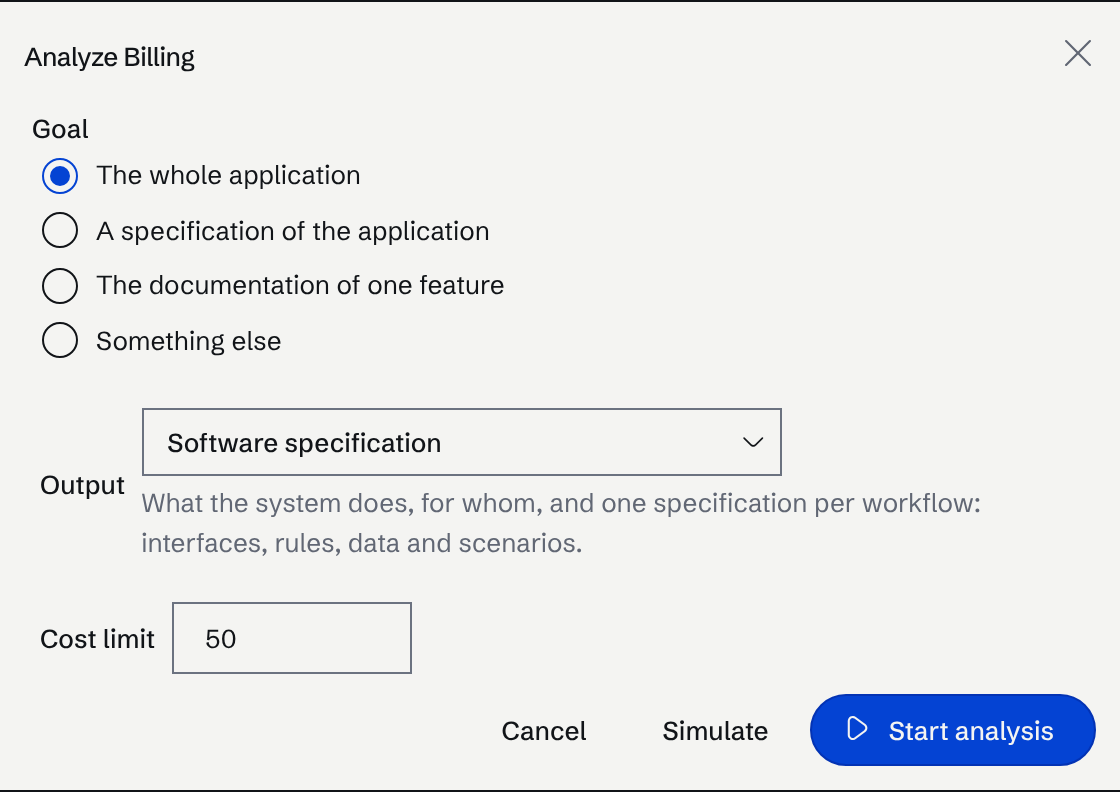
Choose Analyze on the application page. The first time, Start analysis opens the goal dialog; once an analysis exists, New analysis does.
| Goal | What you get |
|---|---|
| The whole application | The inventory, the workflows, the units explained, and a specification. |
| A specification of the application | The same, with the specification written for that purpose. |
| The documentation of one feature | Describe the feature (for example, "how a late payment fee is charged"). The analysis first works out which entry points and units the feature needs, then explores only those and writes the feature's documentation. |
| Something else | Say in a sentence what the analysis should produce, and for whom. |
Output is the template the Write stage fills (see Output templates); the dialog shows what each one writes.
Cost limit is what the analysis may spend on the model, in the currency set under Manage › AI › LLM Usage (20 by default). A larger application, or a broader goal, needs more. See What an analysis costs.
The four stages
| Stage | What Atlas does without a model | What the model sessions do |
|---|---|---|
| Map | Counts files and lines per language, lists build and deployment files and data objects, and ranks entry-point candidates: HTTP handlers, scheduled jobs, message listeners, UI handlers, main methods, triggers and the programs JCL steps run. Writes inventory.md. |
Confirm the entry points and describe the system. With a narrower goal, record what the goal needs. |
| Explore | Picks entry points by how much code they reach, then orders the units they reach so a unit's callees come before it, in batches of up to 12 units or 700 lines. Records the units no entry point reaches. | Trace each entry point inward (validation, orchestration, rules, data, external calls, output) into workflows/*.md. Explain each batch of units: what it does, its rules, its data access, its calls to other systems. Link facts that support or contradict a workflow. |
| Write | Fill the output template: each of its documents, citing findings. | |
| Check | Re-resolves every citation against the source and demotes the claims whose lines no longer exist. Writes README.md: the numbers, the cost, the open questions and the list of documents. |
Check claims against the source, and propose characterization scenarios: inputs and the outputs the code should produce, for tests before a change. Then write conclusion.md: what the application does, how sure the analysis is, what it did not cover, open questions and next steps. |
Output templates
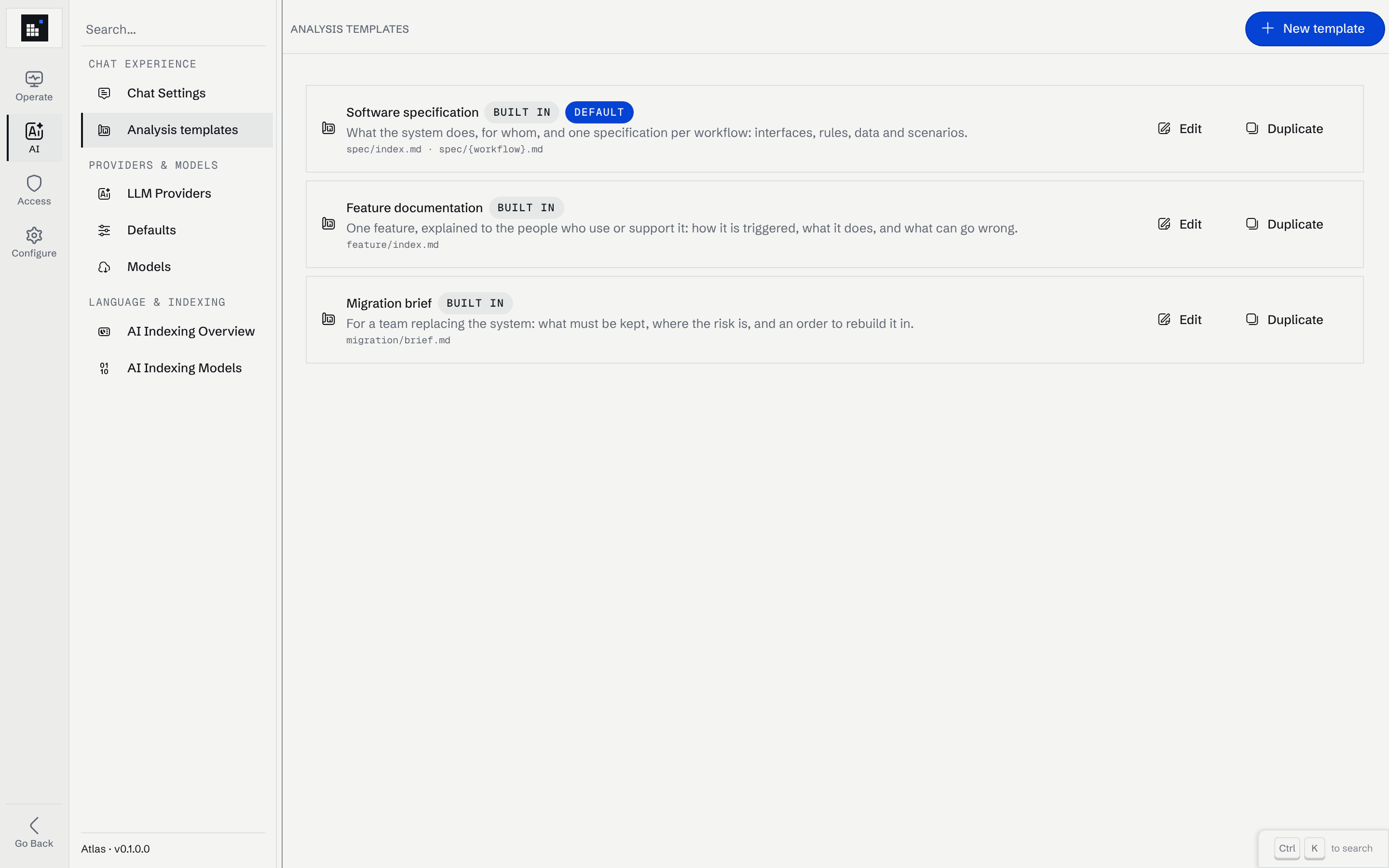
An output template decides what the Write stage produces: its documents, the skeleton of each (its headings in order, with a placeholder for what goes under each), and the instructions the model follows to fill them. Manage them under Manage › AI › Analysis templates.
| Template | Writes |
|---|---|
| Software specification | spec/index.md, then one spec/<workflow>.md per workflow: interfaces, rules, data, scenarios. The default. |
| Migration brief | migration/brief.md: scope, a table of business rules, data, integrations, ranked risks, and an order to rebuild the system in. |
| Feature documentation | feature/index.md: how one feature starts, what it does step by step, its rules, errors and examples. Pair it with a goal that names the feature. |
The built-in templates can be edited. Duplicate one to start a template of your own, or choose New template:
- Instructions are what the model reads before it writes: who the reader is, what to stress, what to leave out. Write them as you would brief an analyst.
- Documents each have a path ending in
.md, a title and a skeleton. Mark a document One per workflow to write it once for every workflow the analysis traced, and put{workflow}in its path, as inspec/{workflow}.md. - A template cannot write
README.md,inventory.md,conclusion.mdorworkflows/: the analysis writes those itself.
In the Write stage, each document is one task. The model runs template to read the instructions and the skeleton, keeps the skeleton's headings in order, fills each one from the findings with citations, and writes "Not established" where the evidence stops. An analysis keeps a copy of its template from the moment it starts, so editing a template does not change an analysis in progress.
What an analysis costs
Every model call is priced with the model prices under Manage › AI › LLM Usage (import the reference prices there, or set your own) and added to the analysis as it happens. The analysis page shows what was spent against the limit, and its tooltip the calls and tokens.
Each stage may spend up to a share of the limit before it hands over to the next: map up to 15%, tracing entry points up to 45%, explaining units up to 70%, writing up to 80%, checking up to 90%. A stage that needs less leaves the rest to the stages after it.
At 90% the analysis concludes: the session in progress stops (what it recorded stays), no new work starts, citations are checked, and a last session spends the remaining 10% writing conclusion.md, which says what was not covered. Every analysis ends with a conclusion, whether it ran out of budget or not.
If a model call cannot be priced, because the model has no price, the analysis pauses and says which model. Set its price, then choose Resume.
Evidence
Everything an analysis concludes is a finding: an entry point, a workflow, a unit, a rule, a data access, an integration, a disagreement between two findings, a missing link, an open question, a scenario. A finding names the symbols it is about and cites the lines it rests on, and findings link to each other: one supports or contradicts another.
A finding's confidence comes from its citations, not from the model's wording:
| Confidence | Means |
|---|---|
| Supported | Every line range it cites exists in the revisions analyzed. |
| Hypothesis | At least one citation does not resolve. Treat it as a lead. |
| Verified | A check read the cited source and confirmed the claim. |
| Rejected | A check found the source says otherwise. |
Read Hypotheses before you rely on a document: they are where the model went beyond what it could show.
Watching a run
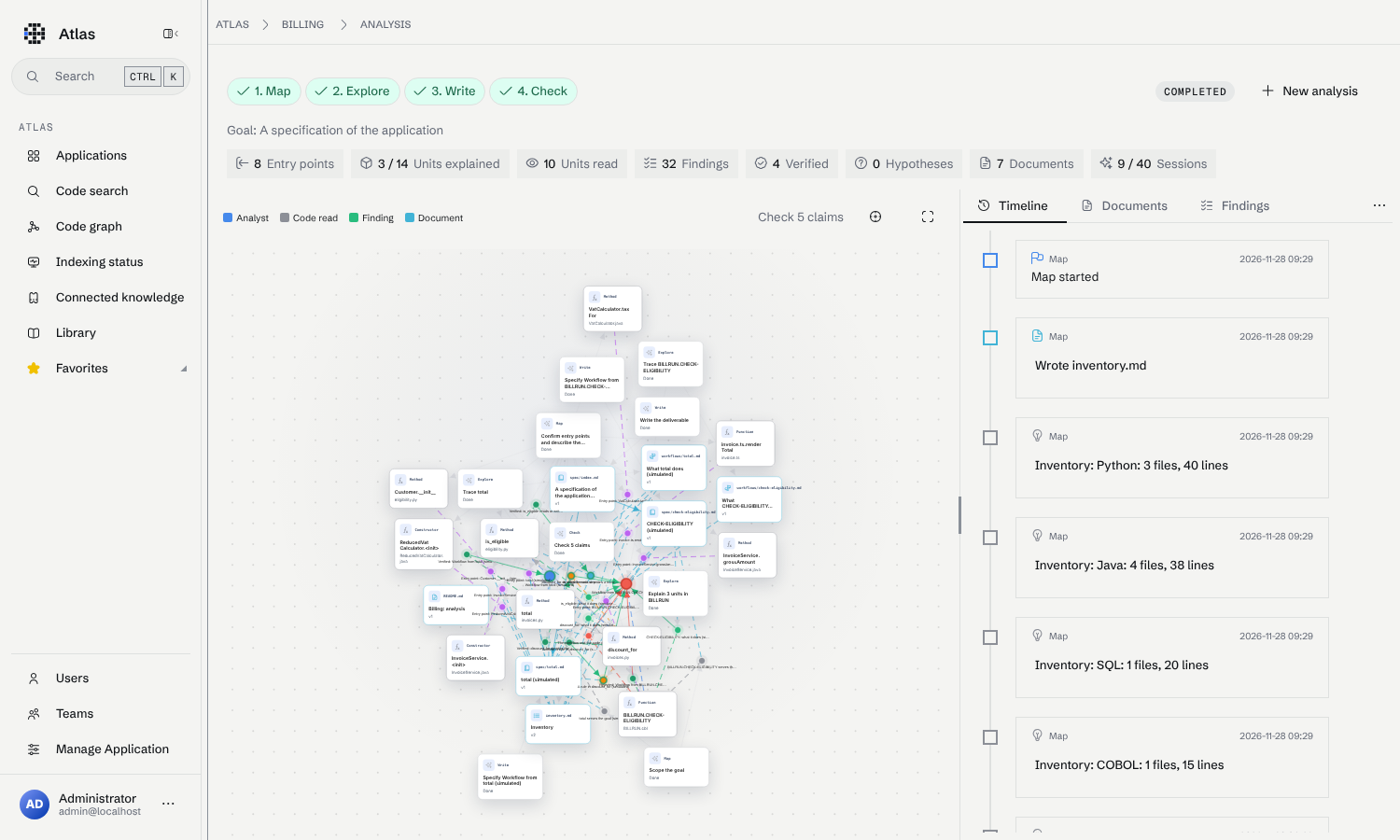
The analysis page updates as the run goes.
- The stage strip shows where the run is.
- The counters show entry points, units explained out of the units in scope, units read, findings, verified findings, hypotheses, documents, and what the analysis spent against its limit.
- The graph draws what the analyst touches as it touches it: a unit it read is a card, one it only saw is a dot, findings and documents connect what they are about. Older nodes fade as newer work arrives, and all of them come back when the run ends. Follow the analyst keeps the view on the latest work; Whole graph fits everything.
- Timeline lists the run's events: stages, tasks, findings, links, checks and documents. Select one to open what it is about.
- Documents and Findings list what the run wrote and recorded so far. A document opens as it is now, and Open in the library opens it in the Library.
Stop cancels the run; everything it recorded so far stays. Resume continues a stopped run, skipping the tasks it finished. A run the server stopped (a restart, an update) is paused rather than restarted: resuming it is your decision.
The documents
| Document | Written in | Contains |
|---|---|---|
inventory.md |
Map | Languages, build and deployment files, data objects, entry-point candidates and why each was picked. |
workflows/<entry point>.md |
Explore | What happens from one entry point inward, step by step, with citations. |
spec/index.md |
Write | The document the goal asked for. |
README.md |
Check | The analysis in numbers, the open questions and the list of documents. |
The documents are collaborative: people can edit them while the analysis writes, and later stages read them as they are, edits included. See The Library.
What an analysis does not do
- It does not run the code. Everything comes from the index and the source text.
- It does not see dynamic calls, reflection, configuration-driven dispatch or languages no indexer covers, except where a model session reads the text and says so in a finding.
- It does not decide what is correct. A verified finding matches the source; whether the source does what the business needs is for a person to judge.
- The quality of the prose depends on the model you configure.