

Graph Model
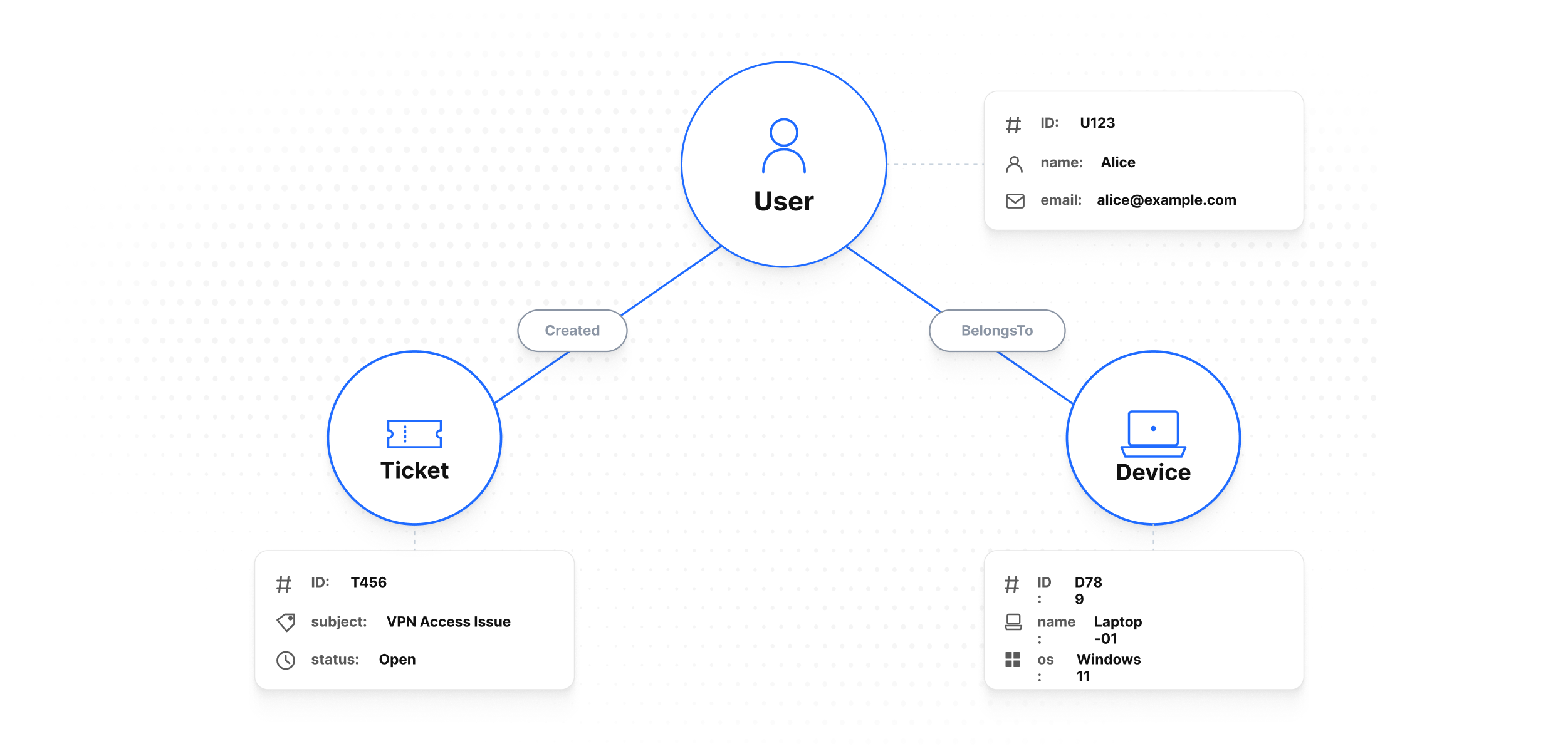
Curiosity Studio represents data as a labeled property graph:
- Nodes represent entities (e.g.,
User,Ticket,Device,Policy) - Edges represent relationships (e.g.,
Created,Mentions,BelongsTo) - Properties store structured fields on nodes
Properties live on nodes, not edges
Curiosity stores properties only on nodes. An edge carries just its type (a name), its target node, and a creation timestamp — it has no user-defined fields. When you need to attach data to a relationship (a role, a score, a date range), model the relationship as an intermediate node. See Property Graph Model → Edges.
The graph model is the backbone for:
- exploration (“show me related things”)
- context building (neighbors, clusters, paths)
- graph-constrained search (“search within this customer’s accounts”)
Schemas: types and constraints
Workspaces are schema-driven:
Internal Schemas
Curiosity includes built-in schemas for core functionality (e.g., _FileEntry, _User, _AccessGroup). These internal schemas are prefixed with an underscore (_) and are protected from modification or deletion.
Internal node types may have different user-facing display names in the UI. For example, the _AccessGroup node type is visible to users as Team.
- Node schemas define node types and their keys/properties.
- Edge schemas define relationship types. An edge schema is just a name — edges carry no properties of their own, so there is nothing else to declare. Direction is a naming convention (add a reciprocal edge if you traverse both ways).
Why schemas matter:
- schemas make data predictable for applications and endpoints
- schemas reduce ambiguity in search configuration (which fields exist?)
- schemas enable governance (what is allowed to be ingested?)
Keys: identity and deduplication
Every node type should have a stable key (or a deterministic ID strategy). Keys determine:
- whether ingestion updates an existing node or creates a new one
- how external systems reference nodes
- how you build safe connectors (idempotency)
Common patterns:
- Natural key: a stable domain ID (
ticket_id,email,device_serial) - Synthetic key: generated ID stored externally and reused
- Deterministic hash: stable hash of a canonical record (careful with schema evolution)
Relationships: modeling decisions
Edges can be used for:
- navigation: user → tickets → product
- faceting/filtering: ticket → status, ticket → team
- enrichment: entity mentions → resolved entities
A useful modeling rule:
- Properties store attributes (string/number/date values, always on nodes)
- Edges store associations (connect one entity to another entity)
Unique vs. non-unique edges
When you add an edge you choose whether it is unique:
- Non-unique edge (default): adding the edge always creates a new link, even if an identical one already exists. Multiple edges of the same type between the same two nodes are allowed (the graph is a multigraph). Use this when each occurrence is meaningful — for example, one edge per event.
- Unique edge: adding the edge is idempotent. A unique edge is identified by its type, source node, and target node; adding the same combination again returns the existing edge instead of creating a duplicate. Use this for set-valued relationships such as membership ("user is in team") where the link either exists or it does not.
Both are added through the graph write API (AddUniqueEdge vs AddEdge). Prefer unique edges unless you specifically need to keep repeated occurrences. See Property Graph Model → Edge uniqueness.
Querying the graph
Graph queries typically follow patterns like:
- Start at a node type or a known node
- Traverse in/out along specific edge types
- Filter by property, type, or timestamp
- Return nodes, paths, or aggregates
See Reference → Graph Query Language.
Common pitfalls
- Over-normalizing: turning every string into a node can bloat the graph; reserve nodes for values that need navigation/filtering.
- Under-linking: keeping everything as properties removes graph value; add edges where users will navigate or constrain search.
- Unstable keys: the #1 reason for duplicates during ingestion.
Next steps
- The formal model — assumptions, invariants, internal vs external types, property value types: Property Graph Model
- How retrieval fits into the model: Search Model
- How to design schemas for ingestion: Data Integration → Schema Design