
Curiosity Studio
Sudo
The admin assistant of Curiosity Studio. He works the way a developer works — reads files, runs commands, hands you a diff — and nothing he writes reaches the workspace until you approve it.
Despite the name, he never assumes elevated privileges. He reads the graph as the administrator talking to him, and he asks first.
The problem
A workspace has a lot of surfaces
Endpoints, AI tools, agents, skills, prompt templates, scheduled tasks, migrations, connectors, indexes, node schemas, node renderers, NLP pipelines, chat policies, search settings. Every one of them has an admin page, and every one of them is a different page.
- The surface keeps growing
- A product that grows a new kind of configuration grows a new screen to configure it on, and an assistant driving per-surface tools grows a new tool to match.
- The work spans surfaces
- "Let users filter tickets by product" is a schema field, an index setting, a facet and possibly a migration. Four screens, in an order you have to know.
- Changes are unreviewable
- A configuration edited screen by screen has no diff. What changed is whatever you remember changing.
- The answer is one layer down
- All of it already round-trips through the definitions export as plain files — the export zip, the WebDAV mount, the git-tracked configuration.
The idea
Hand him the configuration as a filesystem
There is one tool, one sandbox, and one way into the workspace.
Your configuration is already files, so Sudo changes it the way anyone changes files: cat and grep to read, sed or a heredoc to edit, build to compile, commit to hand it over.
A new kind of surface needs no new tool. A new export folder is a new folder.
The filesystem
Nine mounts, two of them writable
/
├── workspace/       the configuration, exactly as the definitions export writes it   [writable]
├── reference/       a generated example workspace, one well-formed file per surface  [read-only]
├── docs/            one page per code-execution scope, plus the schema helper        [read-only]
├── sdk/             the C# surface your workspace code is written against            [read-only]
├── proc/            live runtime state, regenerated on every read                    [read-only]
├── session/         his own to-do list                                               [read-only]
├── stage/           the files you uploaded to the Stage area, as text                [read-only]
├── home/uploads/    the files you attached to this conversation                       [read-only]
└── tmp/             scratch, discarded with the session                              [writable]
Only a write under /workspace is a change to your workspace. That is what makes diff and commit answerable by comparing one directory against the live configuration.
The filesystem
What is in each one
Reading the workspace
/workspace—code/endpoints/,code/agents/,config/schemas/nodes/,nlp/… one file per thing you configure by hand./reference— a well-formed example of every file kind, regenerated with the product, so he reads the shape rather than recalling it./docs— what each code-execution scope exposes./sdk— signatures and documentation, bodies rendered as{ ... }.
Reading the running system
/proc/nodetypes,/proc/edgetypes— types with counts (TSV)./proc/exceptions— the 100 most recent (JSON)./proc/audit— who changed what, and when./proc/scheduled-tasks,/proc/connectors,/proc/indexes,/proc/metrics,/proc/logs./proc/runs/<id>/—status,log,outputfor anything this session started.
/proc regenerates on every read, so the same cat a minute later shows how far a still-running task has got, and jq works on it directly.
The sandbox
One tool: a shell that never leaves the process
The interpreter is Computerwelt, an open-source .NET library providing an in-process bash and an in-process Python over one virtual filesystem. Both are managed C# implementations of the language.
- No
bashbinary - There is no
PATHlookup. A command is either one the sandbox implements or a "command not found". - No CPython
pythoncannot import a native module or reach the host. Monty implementsjson,re,math,datetime,collections,os,pathlib,io,glob,dataclassesand a few more.- No process at all
- Nothing is forked, nothing is executed, no container is started.
- Everything else works
ls,cat,grep,rg,find,sed,awk,cut,sort,uniq,wc,diff,jq,yq,xargs, pipes, redirection, heredocs, subshells, functions, loops, variables, arithmetic.
A configuration assistant that shells out to a real shell has the host's authority. One that interprets the script itself has only what its host handed it.
The sandbox
Absent, not blocked
What is missing by construction
- No host filesystem. All I/O goes through the virtual filesystem. No path resolves to a file on the server.
- No process spawning. No
fork, noexec, noPATH. - No network.
curl,wget,nc,ssh,gitand the rest are withheld rather than present and refusing — so the day the library grows one, the session does not silently acquire it. - No writes outside
/workspaceand/tmp.
Enforced limits
| Limit | Value |
|---|---|
| Wall clock per script | 120 s |
| Commands per script | 100,000 |
| Output captured | 4 MB |
| Idle session lifetime | 30 min |
A cap that is reached raises rather than returning a partial answer, so a traversal that stopped half way is never reported as the whole.
Workspace code can still call out once it has been approved and is running. That is the code's authority, not the assistant's, and it only exists after you approved it.
The sandbox
One session per chat
A session is keyed by the conversation it belongs to. Two administrators in two chats never share a working directory, an uncommitted edit or a to-do list.
- What persists
- Only what the session changed — the files it wrote, the paths it deleted, the working directory, the command history, the to-do list. A session that only ever read leaves nothing behind.
- What does not
- Everything else is re-read from the live workspace on every command. An endpoint someone else edited in the admin pages meanwhile is the one Sudo sees on his next command.
- Which is not a snapshot
- Resuming means finding the file where he left it, in a workspace that has moved on — not restoring the workspace as it was.
The commands
What the sandbox adds on top of bash
A small set of commands for what a text editor and grep cannot do.
Reading
graph types·graph stats <type>·graph sample <type>graph get <uid> [--edges]·graph edges·graph historygraph search <text>— as the chatting admin would see itquery— read-only, under the admin's own permissionstype <name>— the generated helper for one type
Changing and operating
status·diff— what this session has touchedbuild— parse and compile every changed filecommit -m "why"— stage the change set and stoprun task/run migration/run reindexuid endpoint /api/…— mint a stable UIDtasks— his own plan, rendered to/session/todo.md
graph and query are read-only, run under the chatting administrator's permissions, and skip node types that are never returned to clients.
The loop
Read, edit, build, commit, approve
The interface
Where the conversation happens
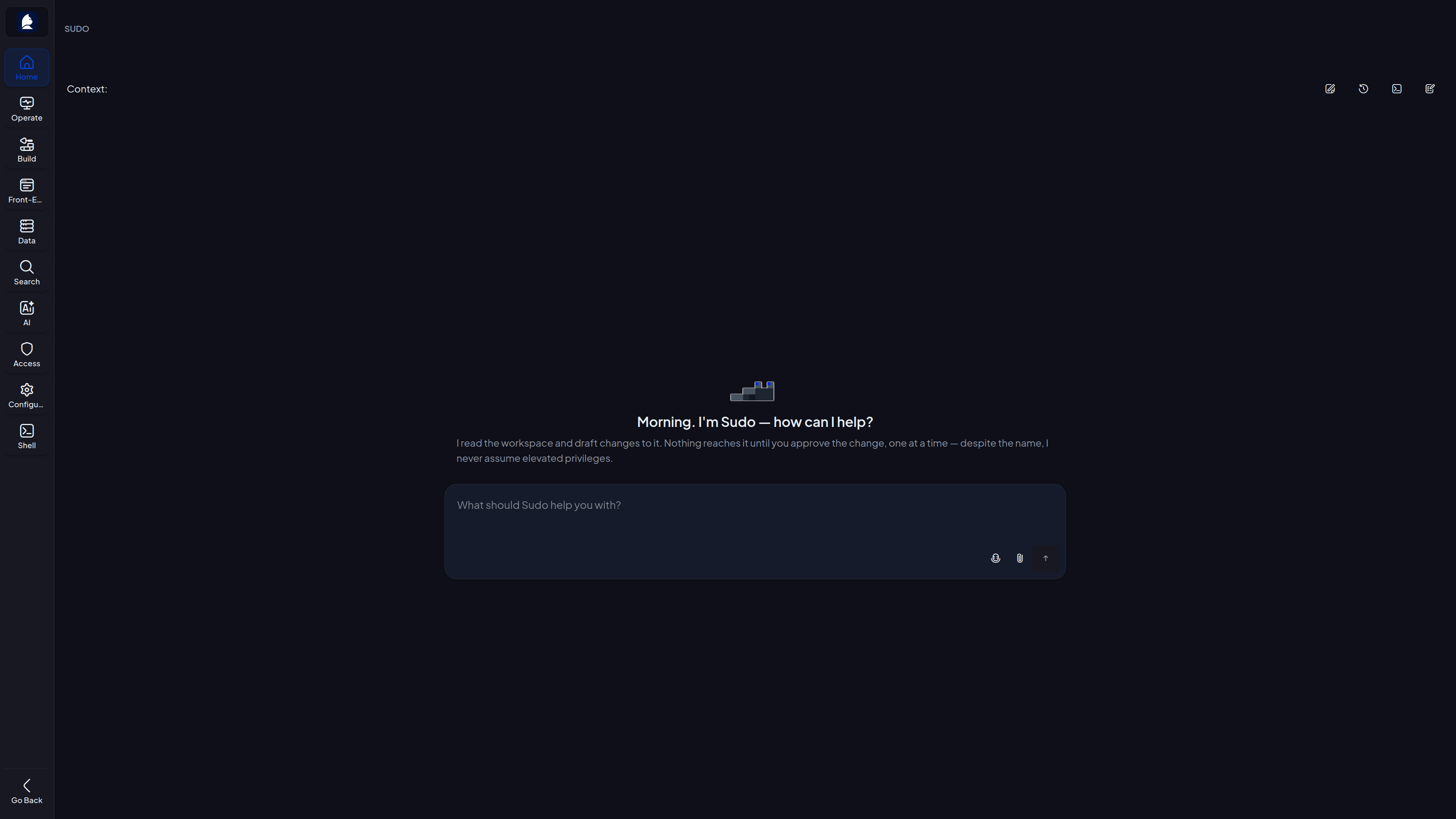
The admin chat pane is collapsed by default and opens from a floating toggle carrying his avatar. Its expand button opens the same conversation full-screen, with room to read a diff.
The open session is kept in the address, so a refresh, a bookmark, or a link sent to another administrator comes back to that session rather than to whichever one the page was opened on.
The interface
The full-screen assistant
The interface
The pane knows what you are looking at
The admin interface hands him a UI context block: the surface in the foreground tab is the active context — what "this endpoint" refers to when you say it — and everything open in adjacent tabs is background context used to disambiguate.
- The pending-changes panel
- The commit he has staged, if any, and the button that opens it for review.
- The terminal window
- The same shell he is working in, opened from the chat toolbar, for when you would rather look yourself. Tab completion offers his uncommitted files.
- The built-in editors
- He perches on the modal of a built-in AI tool, agent, skill or prompt template, which is how you tell a built-in from something your workspace authored.
- The attach button
- Uploads a file into the conversation; he reads it at
/home/uploads/<name>. A PDF or spreadsheet reads as extracted text, a.zipas a directory he can walk.
Approval
commit stages a change set and stops
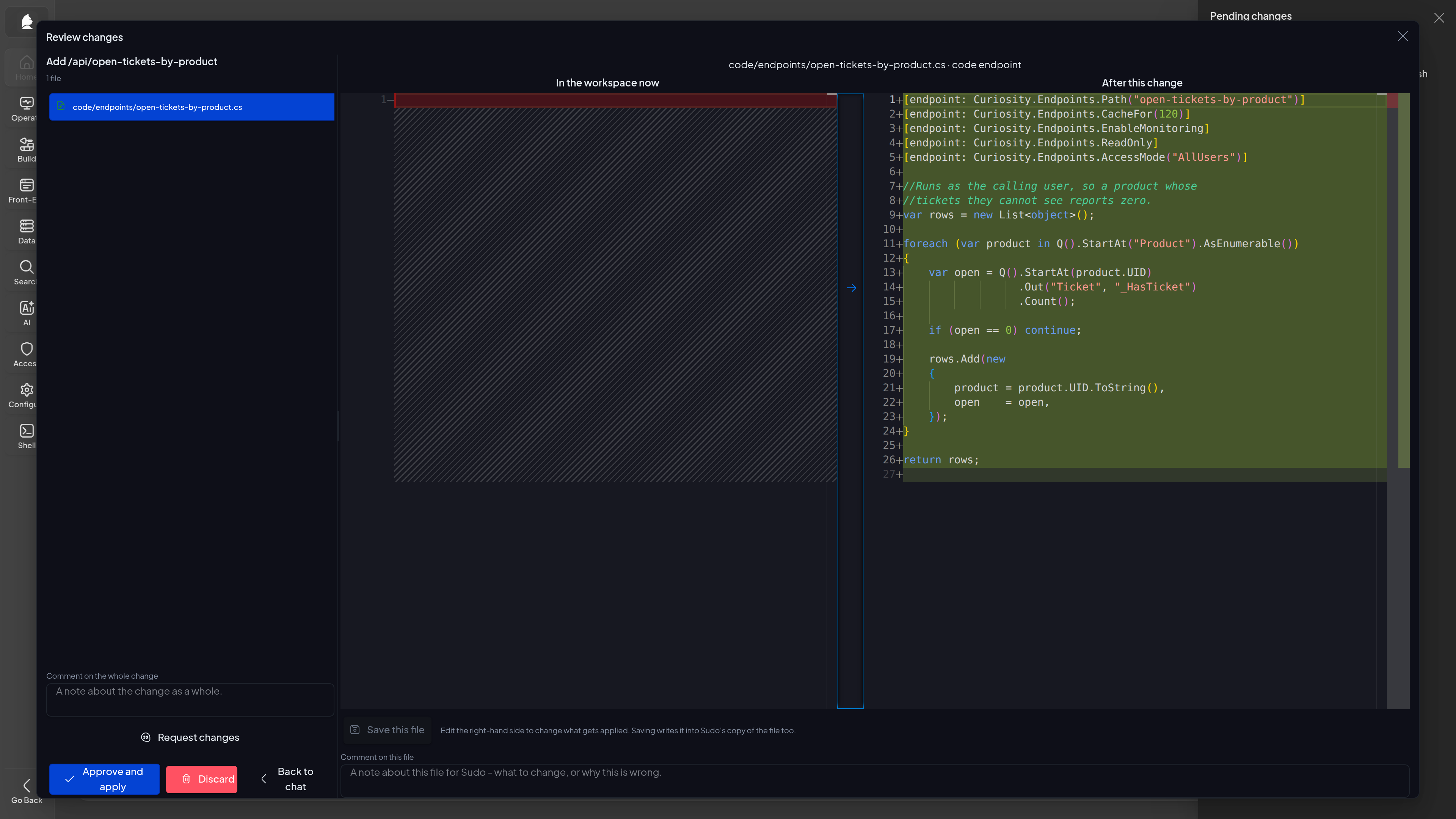
What you approve is the diff you were shown.
- Build before commit
commitparses every changed file back through the workspace's own importer and compiles its body against the scope it will run in — and against the workspace as the whole change set leaves it. It refuses the whole set if anything fails.--forceexists, says so loudly, and still needs your approval.- One way in
- An approved commit is an ordinary definitions import of the files that differ, routed by exactly the same code that reads an uploaded definitions bundle. There is no parallel set of per-surface writers that could drift out of step with it.
- One tracked change per approval
- The import runs inside the workspace's tracked configuration change, so an approved commit is one commit in the configuration git history, attributed to the administrator who approved it.
Approval
Reviewing a change
Approval
Two shapes, three buttons
How the diff is presented
- File list — the changed files with a side-by-side diff for the one you select. Best for checking one file closely.
- Pull request — every file's diff one after the other down one page, with a comment box under each. Best for a change that spans several files.
The diff is read-only on purpose: editing his draft in the review screen would leave the file in his shell disagreeing with what was applied.
What the buttons do
- Approve — applies every file, streaming its progress on the server. Closing the tab costs you the log, not the change.
- Discard — throws the commit away and keeps the edits. Tell him what to change.
- Reset — throws away every uncommitted edit, putting his shell back to the live configuration.
A card left open while he staged a newer commit refuses to apply: the id you were shown and the id he is holding differ, so approving would apply something nobody read.
Approval
What approving actually does
- Deletions first
- A change set that removes an endpoint and adds one on the same route removes before it adds, rather than deleting what it just created. Search-index halves and package declarations are handled together, because they only mean something as a pair.
- Then each file
- Imported through the definitions importer, with the importer's own warnings reported as they happen.
- On success
- One tracked git commit attributed to you, and his session reloads from the live configuration so his next command reads what was actually applied.
- On partial failure
- The errors are reported and the edits are kept. Whatever did not import is still work someone did.
Approving says so in the conversation, in your voice, carrying any notes you typed while reviewing. Discarding says nothing — so silence is not approval.
Prompts · asking
Questions change nothing
About the configuration
- "Which endpoints are reachable without authentication?" —
grep -lover/workspace/code/endpoints/for the public access mode, then each match's header for the route. - "What does the support-triage agent do, and which tools can it call?" —
cat /workspace/code/agents/support-triage.cs; the whole agent is one file. - "Which node types have no search index?" —
/proc/nodetypesagainst/proc/indexes, joined withawk.
About what is running
- "How many Ticket nodes are there, and what does one look like?" —
graph stats Ticketandgraph sample Ticket -n 3. - "Are any scheduled tasks failing?" —
/proc/scheduled-tasksfor the outcome,/proc/exceptionsfor the errors behind it. - "Something broke after the last deploy. What is throwing?" —
/proc/exceptionsby type, then/proc/auditfor what changed around that time.
Prompts · building
Each change ends in a diff
New surfaces
- "Add an endpoint that returns open tickets grouped by product." — reads
/referencefor the file shape and/docsfor the scope, mints a UID withuid endpoint /api/…,builds until it compiles,commits. - "Give the assistant a tool that looks up a customer's open cases." — a file under
code/chat-ai-tools/, written against/sdk, retrieving as the user rather than as the system.
Bigger asks
- "Build me a triage agent that can search the wiki and read tickets." — one file under
code/agents/, system prompt and tool set together, plus whichever tools it names. - "Here is a CSV. Build me a schema and a connector for it." —
file-statsfor the columns and their null counts, then a node schema and a connector, in one commit, because they only make sense together.
Prompts · sandboxes
A sandbox is a tool that hands out a filesystem
An AI tool whose code returns an ISandbox instead of a class of [Tool] methods. It does not answer a question — it describes a filesystem, and calling it runs a bash script against it. Sudo's own shape, handed to your workspace's assistant.
What the code declares
Mounts—Live(rebuilt before every script),Cached(built once per session),Scratch(empty and writable).Commands— for what a file cannot be: an exact count over everything, asearch, aconsult, anything with an effect.DescriptionandFunctionName— what the model reads, and what it calls.
Why hand one out
- A question nobody wrote a tool for gets answered by combining
grep,awk,jq,sortand python. - The session persists across calls, so it is a place to work rather than a query with extra steps.
- Reads go through the chatting user's own permissions, so a sandbox can never show someone data they could not otherwise see.
"Give the support assistant a sandbox over tickets and customers."
Prompts · front and back
One request, several surfaces, one commit
The interesting requests are the ones that do not belong to a single admin page. Say the outcome and let him pick the surfaces.
"Users should be able to filter tickets by product, and see the product on the ticket card."
- Schema
- A field on the node schema at
config/schemas/nodes/Ticket.cs— a C# class, with its access control as attributes on the type and on the individual properties. - Backfill
- A migration under
code/migration-tasks/that fills the field for nodes that already exist —buildcompiles the schema and the code using it together, so both go in one commit. After you approve it,run migrationstarts it and/proc/runs/<id>/logreports progress. - Search
- The index settings under
config/indexes/that make the field facetable. - Front end
- The node renderer and node style under
config/schemas/nodes/renderers/andstyles/, plusconfig/interface.json— what the card shows and how the workspace presents it.
Prompts · operating
Running things and watching them
Starting something
- "Run the nightly refresh now and tell me if it worked." —
run task "Nightly refresh", then reads/proc/runs/<id>/statusandlogas it progresses. - "Reindex Ticket and tell me when it is done." —
run reindex Ticket, then polls the run folder.
Changing something small
- "Turn on the copy disclaimer and shorten chat retention to 30 days." — one
config/*.jsondocument, two values, one small diff. - "Delete the old ingest-from-ftp task." — removes the file and commits the deletion. Deleting a built-in is refused; naming something already gone is a warning, not an error.
Say what you want, not which surface. "Users should be able to filter tickets by product" beats "add a facet" — the right answer might be a facet, an index setting or a schema field, and he can look before deciding.
Limits
What Sudo will not do
- Write without approval
- There is no path from a draft to your workspace that does not pass through a diff you approved, and the approval is bound to the exact commit you were shown.
- Modify your data
graphandqueryare read-only, run under the chatting admin's permissions, and skip node types that are never returned to clients. He reads your data as you can read it and writes none of it — a migration that backfills a field runs only after you approved it.- Reach the network
- The sandbox has no route out.
- Manage people
- He can read access groups and reference one from a definition. Membership is yours, under Manage / Access.
- Read a secret value
- He can declare a secret and write code that reads it. He can never see one.
- Anything else
- No installing packages, no backups, no restarting the workspace, no licensing.
Limits
Your own permissions still apply, and they are narrower
Every session works the same way — Sudo drafts, you approve. What varies is what your account may do.
For a read-only administrator, commit and run refuse.
- The same is true for any administrator while administrator write protection is on.
- Everything that reads still works: he reads the workspace, drafts in his own copy, and the draft is kept for whoever can hand it over.
- The shell is not taken away — that would leave him unable to read the workspace either.
There is nothing for an approval to be an approval of, since the approving administrator would not be allowed to apply it either.
Accountability
Everything leaves a trail
- Every shell call
- Metered into the workspace's own metrics under an Admin Agent bucket, separately from ordinary chat tools.
- Every applied commit
- One entry in the configuration history, attributed to the administrator who approved it, visible under Manage / Access / Audit log and readable from the sandbox at
/proc/audit. - Every code surface
- Carries its own code history too, so an endpoint, AI tool, task or index changed through Sudo is reviewed and rolled back exactly like one changed by hand.
Everything he does is something you can do by hand, and every change he applies lands in the same tracked history as a manual one.
Teaching him
Conventions belong in a skill
His voice and boundaries are a skill in your workspace (sudo-persona), so they are visible and editable rather than hard-wired. Anything you would otherwise repeat at the start of every conversation belongs in one too.
How he is told to behave
- Verify before acting — intent, target, likely impact.
- Proceed on the small and reversible.
- Ask first on the rest — destructive, security-sensitive, externally visible or materially ambiguous.
- Smallest change that works — edit the lines that need editing.
- No invented state, no unconfirmed success.
Getting more out of a session
- Let him plan first on anything multi-step;
/session/todo.mdshows where he is. - Give him the file rather than describing it.
- Ask for the diff early — "show me what that would change" catches a misunderstanding while it is still one file.
- Correct in the chat, not in the review screen.
- One commit per idea.
Read on
Where the detail is
Around it
- Reviewing and approving
- Skills
- Security
- Computerwelt — the sandbox as its own open-source project
The configuration Sudo edits is the same one the definitions export and git sync produce, so a change he applies travels between workspaces like any other.